See which identity files Orbid AI accepts, file size limits, why your law firm asks for KYC documents and what happens after you submit.
In Orbid AI, your law firm must confirm your identity (KYC) before starting legal work. Upload PDF, JPEG, PNG, WebP or HEIC files up to 25 MB each (up to 300 MB per matter) in the Verify step; learn how files are protected on Orbid AI Security.
Before you start
Your identity documents, or your company’s, ready on your device.
A few minutes. You also sign a short declaration.
What can I upload?
Item
Limit
File types
PDF, JPEG, PNG, WebP, HEIC
Size of one file
25 MB
Files for one item
10
Total for one matter
300 MB
Empty files and password-protected PDFs are not accepted. Renaming a file does not change its type.
How do I upload them?
1
Open the Verify step
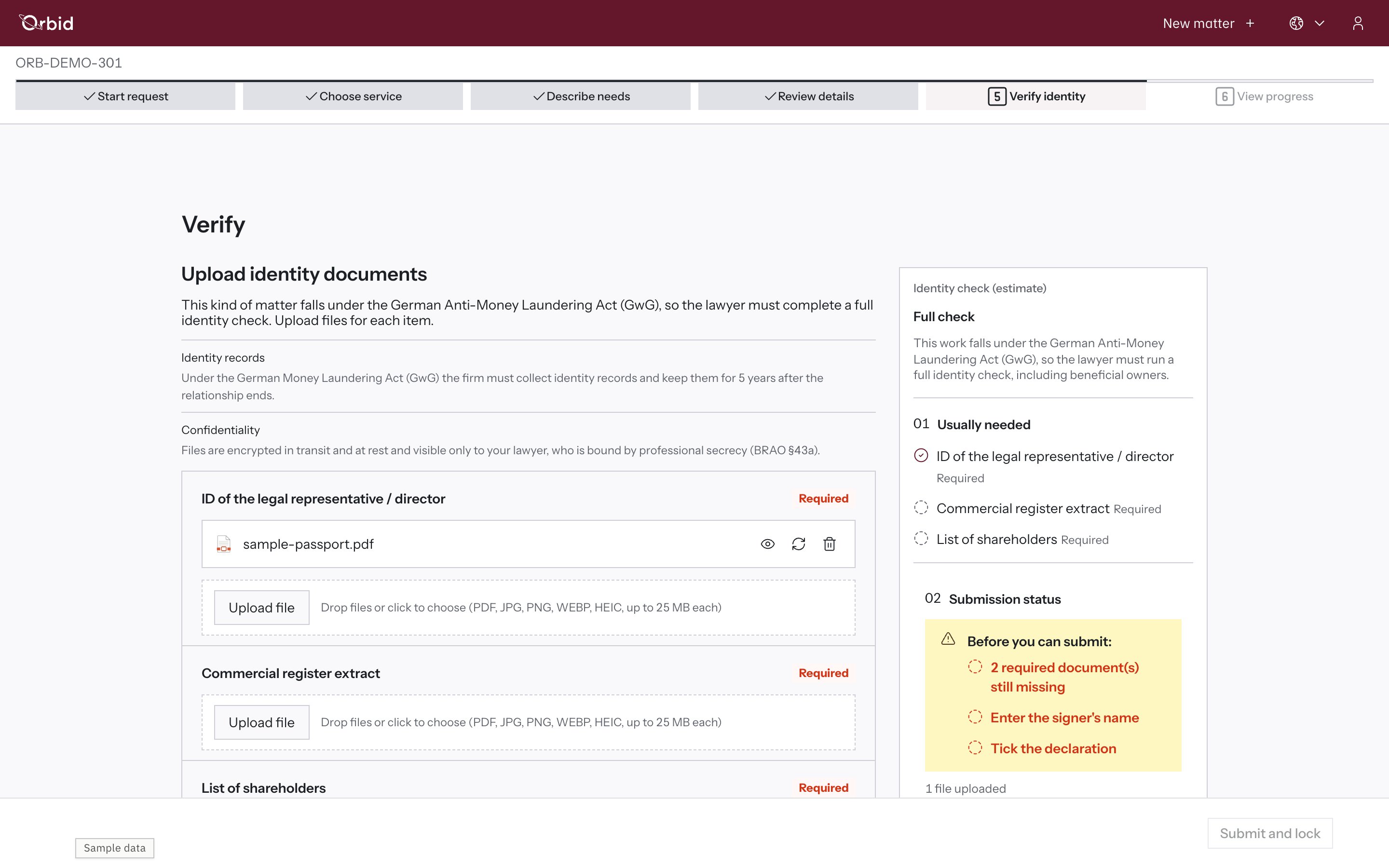
Orbid shows a checklist. Every item marked Required needs at least one file.
2
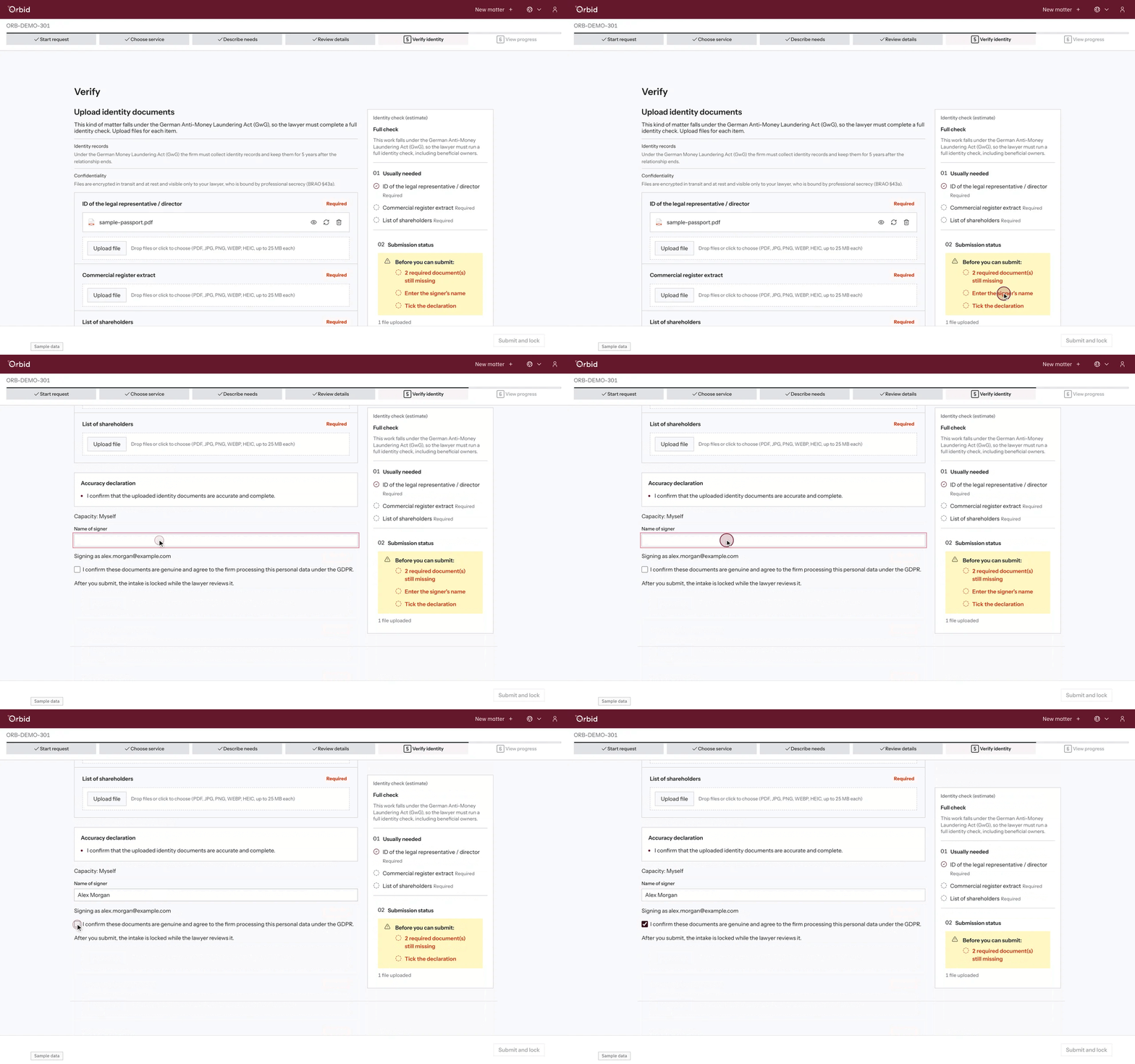
Upload a file for each item
Select Upload file next to an item. To swap a file, select Remove and upload another.
Upload required identity documents on the Verify checklist
3
Sign
Read the consent text and type the name of the person who signs.
4
Submit
Select Submit and lock. If a required item has no file, Orbid says which one.
Confirm consent, type your signatory name and lock the submission
Why does the firm need this?
The lawyer must know who the client is before taking on the work. Some matters need a full check, which can include the people who own the company. Orbid shows which check applies, and the lawyer decides what is needed.
What am I agreeing to?
You confirm the documents are genuine. You also agree that the firm may handle your personal data. This can mean sending it to Germany under China’s data rules (PIPL), or handling it under the GDPR. If you do not agree, talk to your firm before you upload.
What happens after I upload?
A lawyer looks at each item by hand and marks it as passed. The firm cannot send you a quote until every required item has passed. If the lawyer needs more, you see a request in your workspace. See Track your matter.
Orbid’s AI may point out a problem, such as an expired or unclear document. A lawyer always makes the final decision.
If something goes wrong
What you see
What to do
“File too large (max 25 MB each)”
Make the file smaller or upload fewer pages per file.
{"docsConfig":{"theme":"maple","$schema":"https://mintlify.com/docs.json","name":"Orbid AI","description":"Orbid AI Help Center: guides for clients and law firms on submitting matters, identity checks, quotes, payment, document delivery and team administration.","colors":{"primary":"#8B1E1E","light":"#E06B6B","dark":"#8B1E1E"},"logo":{"light":"https://mintcdn.com/startosphere/BPr8xYo-TXQ5Yhl_/logo/light.svg?fit=max\u0026auto=format\u0026n=BPr8xYo-TXQ5Yhl_\u0026q=85\u0026s=bda011f48657a2dcbd0dff0a20365b03","dark":"https://mintcdn.com/startosphere/BPr8xYo-TXQ5Yhl_/logo/dark.svg?fit=max\u0026auto=format\u0026n=BPr8xYo-TXQ5Yhl_\u0026q=85\u0026s=a386920a91be8c47b513a8d7b1d16be9","href":"https://orbid.dev/"},"favicon":"https://mintcdn.com/startosphere/APvJixAMicQYRrst/favicon.svg?fit=max\u0026auto=format\u0026n=APvJixAMicQYRrst\u0026q=85\u0026s=8a94c4be52f74a19f167a83ffddb17ae","appearance":{"default":"system","strict":false},"background":{"decoration":"gradient","color":{"light":"#FFFFFF","dark":"#0E0B0B"}},"seo":{"metatags":{"og:type":"website","og:locale":"en_US","og:site_name":"Orbid AI Help Center","og:image":"https://docs.orbid.dev/images/og-image.png","og:image:width":"1200","og:image:height":"630","og:image:alt":"Orbid AI Help Center — guides for clients and law firms","twitter:card":"summary_large_image","twitter:image":"https://docs.orbid.dev/images/og-image.png","twitter:image:alt":"Orbid AI Help Center — guides for clients and law firms","format-detection":"telephone=no","theme-color":"#FFFFFF","apple-mobile-web-app-title":"Orbid AI Docs"},"paths":[{"path":"de","metatags":{"og:locale":"de_DE","og:image:alt":"Orbid AI Hilfe-Center — Anleitungen für Mandantinnen, Mandanten und Kanzleien","twitter:image:alt":"Orbid AI Hilfe-Center — Anleitungen für Mandantinnen, Mandanten und Kanzleien"}},{"path":"zh-TW","metatags":{"og:locale":"zh_TW","og:image:alt":"Orbid AI 說明中心 — 客戶與律師事務所操作指南","twitter:image:alt":"Orbid AI 說明中心 — 客戶與律師事務所操作指南"}},{"path":"zh-CN","metatags":{"og:locale":"zh_CN","og:image:alt":"Orbid AI 帮助中心 — 客户与律所操作指南","twitter:image:alt":"Orbid AI 帮助中心 — 客户与律所操作指南"}}],"organization":{"id":"https://orbid.dev/#organization","name":"Orbid AI","url":"https://orbid.dev","logo":"https://docs.orbid.dev/logo/light.svg","sameAs":["https://orbid.dev","https://docs.orbid.dev"]},"indexing":"navigable"},"fonts":{"heading":{"family":"Inter","weight":650},"body":{"family":"Inter","weight":400}},"icons":{"library":"fontawesome"},"styling":{"eyebrows":"breadcrumbs","codeblocks":"system","latex":false},"integrations":{"ga4":{"measurementId":"G-YK5SB959CT"}},"contextual":{"options":["copy","view","chatgpt","claude","perplexity"],"display":"toc"},"thumbnails":{"preset":"headline","appearance":"light","surface":"brand"},"interaction":{"drilldown":false},"metadata":{"timestamp":true},"navigation":{"languages":[{"language":"en","default":true,"footer":{"socials":{"website":"https://orbid.dev"},"links":[{"header":"Orbid AI","items":[{"label":"Website","href":"https://orbid.dev/"},{"label":"Pricing","href":"https://orbid.dev/pricing"},{"label":"Book a demo","href":"https://orbid.dev/book"}]},{"header":"Help","items":[{"label":"FAQ","href":"/help/faq"},{"label":"Glossary","href":"/help/glossary"}]}]},"navbar":{"links":[{"href":"https://orbid.dev/book","label":"Book Demo"},{"href":"https://orbid.dev/pricing","label":"Pricing"}],"primary":{"type":"button","label":"Open Orbid AI","href":"https://orbid.dev"}},"href":""},{"language":"de","default":false,"footer":{"socials":{"website":"https://orbid.dev"},"links":[{"header":"Orbid AI","items":[{"label":"Website","href":"https://orbid.dev/"},{"label":"Preise","href":"https://orbid.dev/pricing"},{"label":"Demo vereinbaren","href":"https://orbid.dev/book"}]},{"header":"Hilfe","items":[{"label":"Häufige Fragen","href":"/de/help/faq"},{"label":"Glossar","href":"/de/help/glossary"}]}]},"navbar":{"links":[{"href":"https://orbid.dev/book","label":"Demo vereinbaren"},{"href":"https://orbid.dev/pricing","label":"Preise"}],"primary":{"type":"button","label":"Orbid AI öffnen","href":"https://orbid.dev"}},"href":"de"},{"language":"zh-Hant","default":false,"footer":{"socials":{"website":"https://orbid.dev"},"links":[{"header":"Orbid AI","items":[{"label":"官方網站","href":"https://orbid.dev/"},{"label":"價格方案","href":"https://orbid.dev/pricing"},{"label":"預約示範","href":"https://orbid.dev/book"}]},{"header":"說明","items":[{"label":"常見問題","href":"/zh-TW/help/faq"},{"label":"術語表","href":"/zh-TW/help/glossary"}]}]},"navbar":{"links":[{"href":"https://orbid.dev/book","label":"預約示範"},{"href":"https://orbid.dev/pricing","label":"價格方案"}],"primary":{"type":"button","label":"開啟 Orbid AI","href":"https://orbid.dev"}},"href":"zh-TW"},{"language":"zh-Hans","default":false,"footer":{"socials":{"website":"https://orbid.dev"},"links":[{"header":"Orbid AI","items":[{"label":"官方网站","href":"https://orbid.dev/"},{"label":"价格方案","href":"https://orbid.dev/pricing"},{"label":"预约演示","href":"https://orbid.dev/book"}]},{"header":"帮助","items":[{"label":"常见问题","href":"/zh-CN/help/faq"},{"label":"术语表","href":"/zh-CN/help/glossary"}]}]},"navbar":{"links":[{"href":"https://orbid.dev/book","label":"预约演示"},{"href":"https://orbid.dev/pricing","label":"价格方案"}],"primary":{"type":"button","label":"打开 Orbid AI","href":"https://orbid.dev"}},"href":"zh-CN"}]}},"deployment":{"deploymentMetadataValue":{"subdomain":"startosphere","hasAudioNarration":false,"actualSubdomain":"startosphere","customDomains":["docs.orbid.dev"],"gitSource":{"type":"github","owner":"leon-sg","repo":"docs","deployBranch":"main","contentDirectory":"","isPrivate":false,"mountPath":"","label":""},"feedback":{"thumbs":true,"edits":true,"issues":true},"entitlements":{},"buildId":"6b044348ee7eab21fbdb8088","clientVersion":"0.0.4340","searchFilterCounts":[{"language":"en","tag":"For clients","count":6},{"language":"de","tag":"Für Mandanten","count":6},{"language":"zh-Hans","tag":"客户","count":6},{"language":"zh-Hant","tag":"客戶","count":6},{"language":"en","tag":"Administration","count":5},{"language":"en","tag":"For law firms","count":5},{"language":"de","tag":"Verwaltung","count":5},{"language":"de","tag":"Für Kanzleien","count":5},{"language":"zh-Hans","tag":"管理","count":5},{"language":"zh-Hans","tag":"律所","count":5},{"language":"zh-Hant","tag":"管理","count":5},{"language":"zh-Hant","tag":"律師事務所","count":5},{"language":"en","tag":"Get started","count":3},{"language":"de","tag":"Einstieg","count":3},{"language":"zh-Hans","tag":"开始使用","count":3},{"language":"zh-Hant","tag":"開始使用","count":3},{"language":"en","tag":"Help","count":2},{"language":"de","tag":"Hilfe","count":2},{"language":"zh-Hans","tag":"帮助","count":2},{"language":"zh-Hant","tag":"說明","count":2}]},"assistantConfig":{"enableAskAiButton":false,"enableStarterQuestions":false,"enableAskAiSearchBar":true},"basePath":"","hasChatPermissions":false,"hasWebMcpPermissions":false,"toggles":[{"name":"kill-isr","enabled":true,"variant":{"name":"disabled","enabled":false,"feature_enabled":true},"impressionData":false},{"name":"custom-rbac-roles","enabled":true,"variant":{"name":"disabled","enabled":false,"feature_enabled":true},"impressionData":false},{"name":"agent-mintlify-slack","enabled":true,"variant":{"name":"disabled","enabled":false,"feature_enabled":true},"impressionData":false},{"name":"agent-integrations-settings","enabled":true,"variant":{"name":"disabled","enabled":false,"feature_enabled":true},"impressionData":false},{"name":"rbac-expansion","enabled":true,"variant":{"name":"disabled","enabled":false,"feature_enabled":true},"impressionData":false},{"name":"automations-pr-grouping","enabled":true,"variant":{"name":"disabled","enabled":false,"feature_enabled":true},"impressionData":false},{"name":"custom-prefix","enabled":true,"variant":{"name":"disabled","enabled":false,"feature_enabled":true},"impressionData":false},{"name":"analytics-v7","enabled":true,"variant":{"name":"disabled","enabled":false,"feature_enabled":true},"impressionData":false},{"name":"user-flows-analytics","enabled":true,"variant":{"name":"disabled","enabled":false,"feature_enabled":true},"impressionData":false},{"name":"no-publish-flow","enabled":true,"variant":{"name":"disabled","enabled":false,"feature_enabled":true},"impressionData":false},{"name":"snapshot-serving-live","enabled":true,"variant":{"name":"disabled","enabled":false,"feature_enabled":true},"impressionData":false},{"name":"stripTemperatureMiddleware","enabled":true,"variant":{"name":"disabled","enabled":false,"feature_enabled":true},"impressionData":false},{"name":"support-platform-pylon-zendesk","enabled":true,"variant":{"name":"disabled","enabled":false,"feature_enabled":true},"impressionData":false},{"name":"snapshot-serving","enabled":true,"variant":{"name":"disabled","enabled":false,"feature_enabled":true},"impressionData":false},{"name":"instant-rollback","enabled":true,"variant":{"name":"disabled","enabled":false,"feature_enabled":true},"impressionData":false},{"name":"granular-notifications-server","enabled":true,"variant":{"name":"disabled","enabled":false,"feature_enabled":true},"impressionData":false},{"name":"granular-notifications","enabled":true,"variant":{"name":"disabled","enabled":false,"feature_enabled":true},"impressionData":false},{"name":"automations-fable","enabled":true,"variant":{"name":"disabled","enabled":false,"feature_enabled":true},"impressionData":false},{"name":"fixed-ai-action-pricing","enabled":true,"variant":{"name":"disabled","enabled":false,"feature_enabled":true},"impressionData":false},{"name":"site-roles","enabled":true,"variant":{"name":"disabled","enabled":false,"feature_enabled":true},"impressionData":false},{"name":"automation-resolve-merge-conflict","enabled":true,"variant":{"name":"disabled","enabled":false,"feature_enabled":true},"impressionData":false},{"name":"scoped-publishing","enabled":true,"variant":{"name":"disabled","enabled":false,"feature_enabled":true},"impressionData":false},{"name":"mintql","enabled":true,"variant":{"name":"disabled","enabled":false,"feature_enabled":true},"impressionData":false},{"name":"page-level-analytics","enabled":true,"variant":{"name":"disabled","enabled":false,"feature_enabled":true},"impressionData":false},{"name":"editor-version-history-v2","enabled":true,"variant":{"name":"disabled","enabled":false,"feature_enabled":true},"impressionData":false},{"name":"billing-page-v2","enabled":true,"variant":{"name":"disabled","enabled":false,"feature_enabled":true},"impressionData":false},{"name":"full-page-search","enabled":true,"variant":{"name":"disabled","enabled":false,"feature_enabled":true},"impressionData":false},{"name":"workspace-projects","enabled":true,"variant":{"name":"disabled","enabled":false,"feature_enabled":true},"impressionData":false},{"name":"fork-pr-previews","enabled":true,"variant":{"name":"disabled","enabled":false,"feature_enabled":true},"impressionData":false},{"name":"revalidation-jwt","enabled":true,"variant":{"name":"disabled","enabled":false,"feature_enabled":true},"impressionData":false},{"name":"hobby-abuse-scan","enabled":true,"variant":{"name":"disabled","enabled":false,"feature_enabled":true},"impressionData":false},{"name":"dashboard-inbox","enabled":true,"variant":{"name":"disabled","enabled":false,"feature_enabled":true},"impressionData":false},{"name":"turbopuffer-dual-write","enabled":true,"variant":{"name":"disabled","enabled":false,"feature_enabled":true},"impressionData":false},{"name":"approve-review-flow","enabled":true,"variant":{"name":"disabled","enabled":false,"feature_enabled":true},"impressionData":false},{"name":"editor-metadata","enabled":true,"variant":{"name":"disabled","enabled":false,"feature_enabled":true},"impressionData":false},{"name":"turbopuffer-serve","enabled":true,"variant":{"name":"disabled","enabled":false,"feature_enabled":true},"impressionData":false},{"name":"live-agents","enabled":true,"variant":{"name":"disabled","enabled":false,"feature_enabled":true},"impressionData":false},{"name":"starter-pricing","enabled":true,"variant":{"name":"treatment","enabled":true,"payload":{"type":"string","value":"treatment"},"feature_enabled":true},"impressionData":false},{"name":"llms-txt-v2","enabled":true,"variant":{"name":"disabled","enabled":false,"feature_enabled":true},"impressionData":false},{"name":"wildcard-email-auth","enabled":true,"variant":{"name":"disabled","enabled":false,"feature_enabled":true},"impressionData":false}],"starterQuestions":[],"privacy":{"consentBanner":{"enabled":true}},"googleFontsInlined":false},"customCss":[{"filePath":"style.css","content":"html{-webkit-text-size-adjust:100%;text-size-adjust:100%;background-color:#ffffff;scroll-padding-top:calc(4.5rem + env(safe-area-inset-top, 0px));scroll-padding-bottom:calc(2rem + env(safe-area-inset-bottom, 0px))}html.dark{background-color:#0e0b0b}body{background-color:#ffffff;touch-action:manipulation;-webkit-tap-highlight-color:rgba(139, 30, 30, 0.14)}html.dark body{background-color:#0e0b0b}#navbar{padding-left:max(1rem, env(safe-area-inset-left, 0px));padding-right:max(1rem, env(safe-area-inset-right, 0px))}footer,#footer{padding-bottom:max(2rem, calc(env(safe-area-inset-bottom, 0px) + 1.25rem));padding-left:max(1rem, env(safe-area-inset-left, 0px));padding-right:max(1rem, env(safe-area-inset-right, 0px))}html:has(.orbid-home-lead) #header{margin:0 0 1.75rem;padding:2.25rem 2rem;border-radius:1rem;border:1px solid rgba(139, 30, 30, 0.14);background:radial-gradient(120% 140% at 0% 0%, rgba(139, 30, 30, 0.10) 0%, rgba(139, 30, 30, 0) 60%),\n linear-gradient(180deg, rgba(139, 30, 30, 0.04), rgba(139, 30, 30, 0))}.dark:has(.orbid-home-lead) #header{border-color:rgba(224, 107, 107, 0.2);background:radial-gradient(120% 140% at 0% 0%, rgba(224, 107, 107, 0.14) 0%, rgba(224, 107, 107, 0) 60%)}html:has(.orbid-home-lead) #header nav[aria-label=\"Breadcrumb\"] li{font-size:0.8125rem;font-weight:600;letter-spacing:0.06em;text-transform:uppercase;color:#8b1e1e}.dark:has(.orbid-home-lead) #header nav[aria-label=\"Breadcrumb\"] li{color:#e06b6b}html:has(.orbid-home-lead) #header #page-title{margin:0.25rem 0 0.5rem!important;font-size:clamp(1.75rem, 1.25rem + 2vw, 2.5rem)!important;line-height:1.15!important;font-weight:700!important;letter-spacing:-0.02em}.orbid-home-lead{margin:0 0 1.5rem;max-width:48rem;font-size:1.0625rem;line-height:1.65}#content-area{line-height:1.7;padding-bottom:max(1.5rem, env(safe-area-inset-bottom, 0px))}#content-area h2{margin-top:2.5rem;letter-spacing:-0.01em}#content-area p,#content-area li,#content-area td,#content-area th,#content-area figcaption{overflow-wrap:break-word}#content-area a,#content-area code{overflow-wrap:anywhere}html[lang^=\"de\"] #content-area p,html[lang^=\"de\"] #content-area li,html[lang^=\"de\"] #content-area td,html[lang^=\"de\"] #content-area figcaption{-webkit-hyphens:auto;hyphens:auto}.card{transition:transform 0.15s ease, box-shadow 0.15s ease, border-color 0.15s ease}@media (hover: hover) and (pointer: fine){.card:hover{transform:translateY(-2px);box-shadow:0 6px 20px -8px rgba(139, 30, 30, 0.25)}}#content-area table{width:100%;max-width:100%;font-size:0.9375rem;line-height:1.55;border-collapse:collapse}#content-area th{font-weight:600;padding-top:0.75rem;padding-bottom:0.75rem}#content-area td{padding-top:0.625rem;padding-bottom:0.625rem;vertical-align:top}#content-area .overflow-x-auto{-webkit-overflow-scrolling:touch;overscroll-behavior-x:contain}@media (max-width: 640px){#content-area th{white-space:normal}#content-area table td:first-child{min-width:108px}#content-area table td:not(:first-child){min-width:0}}[data-component-part=\"step-title\"]{font-weight:600!important;margin-bottom:0!important}[data-component-part=\"step-content\"]>:first-child{margin-top:0.25rem}#content-area figure img,#content-area [data-component-part=\"frame\"] img{height:auto;max-width:100%}#content-area figcaption{font-size:0.875rem;line-height:1.5}footer a,#footer a{color:#44403c!important}.dark footer a,.dark #footer a{color:#d6d3d1!important}@media (hover: hover) and (pointer: fine){footer a:hover,#footer a:hover{color:#1c1917!important}.dark footer a:hover,.dark #footer a:hover{color:#ffffff!important}}@media (pointer: coarse), (max-width: 768px){input,textarea,select{font-size:max(1rem, 16px)!important}#search-bar-entry-mobile,#navbar button,header button,button[aria-label=\"More actions\"],button[aria-label=\"Weitere Aktionen\"],button[aria-label=\"更多操作\"],a.anchor-link{min-width:44px!important;min-height:44px!important;display:inline-flex;align-items:center;justify-content:center}#navbar a.select-none,footer a.select-none,#footer a.select-none{min-height:44px!important;min-width:44px!important;display:inline-flex!important;align-items:center}footer a,#footer a{min-height:44px!important;min-width:44px!important;display:inline-flex!important;align-items:center;padding-top:0.5rem;padding-bottom:0.5rem}footer a.h-fit,#footer a.h-fit{justify-content:center}footer button,#footer button{min-width:44px!important;min-height:44px!important;display:inline-flex!important;align-items:center;justify-content:center}footer>div,#footer>div{padding-left:1rem!important;padding-right:1rem!important}footer div:has(>button),#footer div:has(>button){gap:0.25rem!important;margin-left:auto}footer div:has(>a[href*=\"mintlify.com\"]),#footer div:has(>a[href*=\"mintlify.com\"]){flex-wrap:wrap;row-gap:0.5rem;column-gap:1rem}[data-component-part=\"pagination-prev\"],[data-component-part=\"pagination-next\"],#pagination a,button[data-component-part=\"accordion-button\"],.accordion button{min-height:44px!important;min-width:44px!important}button[aria-label*=\"Send\"],button[aria-label*=\"Senden\"],button[aria-label*=\"傳送\"],button[aria-label*=\"发送\"]{min-width:44px!important;min-height:44px!important}}@media (max-width: 640px){html:has(.orbid-home-lead) #header{padding:1.5rem 1.25rem;margin-bottom:1.25rem}#page-title{word-break:break-word}}[data-component-part=\"pagination-label\"]{white-space:nowrap}[data-component-part=\"pagination-prev\"]{flex-shrink:0}[data-component-part=\"card-content-container\"]{display:flex;flex-direction:column;align-items:flex-start}[data-component-part=\"card-title\"]{margin-top:0.75rem!important}div:has(>a[href*=\"github.com\"]){flex-wrap:wrap}.orbid-motion-static{display:none!important}@media (prefers-reduced-motion: reduce){.orbid-motion-anim{display:none!important}.orbid-motion-static{display:block!important}}"}]}
{"page":{"pagePath":"clients/identity-documents","slug":"/clients/identity-documents","pageMetadata":{"icon":"id-card","title":"Upload identity documents","description":"See which identity files Orbid AI accepts, file size limits, why your law firm asks for KYC documents and what happens after you submit.","sidebarTitle":"Identity documents","keywords":["KYC","identity verification","upload documents","file limits","Orbid"],"href":"/clients/identity-documents"},"description":{"compiledSource":"\"use strict\";\nconst {jsx: _jsx} = arguments[0];\nconst {useMDXComponents: _provideComponents} = arguments[0];\nfunction _createMdxContent(props) {\n const _components = {\n p: \"p\",\n ..._provideComponents(),\n ...props.components\n };\n return _jsx(_components.p, {\n children: \"See which identity files Orbid AI accepts, file size limits, why your law firm asks for KYC documents and what happens after you submit.\"\n });\n}\nfunction MDXContent(props = {}) {\n const {wrapper: MDXLayout} = {\n ..._provideComponents(),\n ...props.components\n };\n return MDXLayout ? _jsx(MDXLayout, {\n ...props,\n children: _jsx(_createMdxContent, {\n ...props\n })\n }) : _createMdxContent(props);\n}\nreturn {\n default: MDXContent\n};\n","frontmatter":{},"scope":{}},"pageType":"default","mdx":{"mdxSource":{"compiledSource":"\"use strict\";const{Fragment:_Fragment,jsx:_jsx,jsxs:_jsxs}=arguments[0];const{useMDXComponents:_provideComponents}=arguments[0];function _createMdxContent(props){const _components={a:`a`,li:`li`,p:`p`,strong:`strong`,tbody:`tbody`,td:`td`,th:`th`,thead:`thead`,tr:`tr`,ul:`ul`,..._provideComponents(),...props.components},{Card,CardGroup,Frame,Heading,Info,OptimizedImage,Step,Steps,Table}=_components;if(!Card)_missingMdxReference(`Card`,true);if(!CardGroup)_missingMdxReference(`CardGroup`,true);if(!Frame)_missingMdxReference(`Frame`,true);if(!Heading)_missingMdxReference(`Heading`,true);if(!Info)_missingMdxReference(`Info`,true);if(!OptimizedImage)_missingMdxReference(`OptimizedImage`,true);if(!Step)_missingMdxReference(`Step`,true);if(!Steps)_missingMdxReference(`Steps`,true);if(!Table)_missingMdxReference(`Table`,true);return _jsxs(_Fragment,{children:[_jsxs(_components.p,{children:[`In `,_jsx(_components.strong,{children:`Orbid AI`}),`, your law firm must confirm your identity (KYC) before starting legal work. Upload PDF, JPEG, PNG, WebP or HEIC files up to 25 MB each (up to 300 MB per matter) in the Verify step; learn how files are protected on `,_jsx(_components.a,{href:`https://orbid.dev/security`,children:`Orbid AI Security`}),`.`]}),`\n`,_jsx(Heading,{level:`2`,id:`before-you-start`,children:`Before you start`}),`\n`,_jsxs(_components.ul,{children:[`\n`,_jsx(_components.li,{children:`Your identity documents, or your company’s, ready on your device.`}),`\n`,_jsx(_components.li,{children:`A few minutes. You also sign a short declaration.`}),`\n`]}),`\n`,_jsx(Heading,{level:`2`,id:`what-can-i-upload`,children:`What can I upload?`}),`\n`,_jsxs(Table,{children:[_jsx(_components.thead,{children:_jsxs(_components.tr,{children:[_jsx(_components.th,{children:`Item`}),_jsx(_components.th,{children:`Limit`})]})}),_jsxs(_components.tbody,{children:[_jsxs(_components.tr,{children:[_jsx(_components.td,{children:`File types`}),_jsx(_components.td,{children:`PDF, JPEG, PNG, WebP, HEIC`})]}),_jsxs(_components.tr,{children:[_jsx(_components.td,{children:`Size of one file`}),_jsx(_components.td,{\"data-numeric\":`true`,children:`25 MB`})]}),_jsxs(_components.tr,{children:[_jsx(_components.td,{children:`Files for one item`}),_jsx(_components.td,{\"data-numeric\":`true`,children:`10`})]}),_jsxs(_components.tr,{children:[_jsx(_components.td,{children:`Total for one matter`}),_jsx(_components.td,{\"data-numeric\":`true`,children:`300 MB`})]})]})]}),`\n`,_jsx(_components.p,{children:`Empty files and password-protected PDFs are not accepted. Renaming a file does not change its type.`}),`\n`,_jsx(Heading,{level:`2`,id:`how-do-i-upload-them`,children:`How do I upload them?`}),`\n`,_jsxs(Steps,{children:[_jsx(Step,{title:`Open the Verify step`,children:_jsxs(_components.p,{children:[`Orbid shows a checklist. Every item marked `,_jsx(_components.strong,{children:`Required`}),` needs at least one file.`]})}),_jsxs(Step,{title:`Upload a file for each item`,children:[_jsxs(_components.p,{children:[`Select `,_jsx(_components.strong,{children:`Upload file`}),` next to an item. To swap a file, select `,_jsx(_components.strong,{children:`Remove`}),` and upload another.`]}),_jsxs(Frame,{caption:`Upload required identity documents on the Verify checklist`,children:[_jsx(`div`,{className:`orbid-motion-anim`,children:_jsx(OptimizedImage,{src:`https://mintcdn.com/startosphere/n5PNQ6tv_d4yWapa/images/screenshots/en/intake-verify-upload.webp?fit=max\u0026auto=format\u0026n=n5PNQ6tv_d4yWapa\u0026q=85\u0026s=46a0c2898f394d6c04ac224142f3f616`,alt:`Orbid AI: Verify step with a checklist of three required items; the first shows an uploaded file 'sample-passport.pdf', the others show 'Upload file', with 'Submit and lock' below; client 'Acme Robotics Ltd.'`,width:`1280`,height:`800`,loading:`lazy`,\"data-og-width\":`1280`,\"data-og-height\":`800`,\"data-path\":`images/screenshots/en/intake-verify-upload.webp`,\"data-optimize\":`true`,\"data-opv\":`3`,srcset:`https://mintcdn.com/startosphere/n5PNQ6tv_d4yWapa/images/screenshots/en/intake-verify-upload.webp?w=280\u0026fit=max\u0026auto=format\u0026n=n5PNQ6tv_d4yWapa\u0026q=85\u0026s=c9848f3fe9747865cff25d259aa0483d 280w, https://mintcdn.com/startosphere/n5PNQ6tv_d4yWapa/images/screenshots/en/intake-verify-upload.webp?w=560\u0026fit=max\u0026auto=format\u0026n=n5PNQ6tv_d4yWapa\u0026q=85\u0026s=9f629fee148b52617695938e4029eb44 560w, https://mintcdn.com/startosphere/n5PNQ6tv_d4yWapa/images/screenshots/en/intake-verify-upload.webp?w=840\u0026fit=max\u0026auto=format\u0026n=n5PNQ6tv_d4yWapa\u0026q=85\u0026s=6dc5af3f7e85d85f1f19f7f631e2e3de 840w, https://mintcdn.com/startosphere/n5PNQ6tv_d4yWapa/images/screenshots/en/intake-verify-upload.webp?w=1100\u0026fit=max\u0026auto=format\u0026n=n5PNQ6tv_d4yWapa\u0026q=85\u0026s=77d084ea4773a3c274a92b56c6afe802 1100w, https://mintcdn.com/startosphere/n5PNQ6tv_d4yWapa/images/screenshots/en/intake-verify-upload.webp?w=1650\u0026fit=max\u0026auto=format\u0026n=n5PNQ6tv_d4yWapa\u0026q=85\u0026s=ccd3a3f926cbb1f12ab27dc5ae5e0aee 1650w, https://mintcdn.com/startosphere/n5PNQ6tv_d4yWapa/images/screenshots/en/intake-verify-upload.webp?w=2500\u0026fit=max\u0026auto=format\u0026n=n5PNQ6tv_d4yWapa\u0026q=85\u0026s=23c0260251a8c4f948c1d02bf1707478 2500w`})}),_jsx(`div`,{className:`orbid-motion-static`,children:_jsx(OptimizedImage,{src:`https://mintcdn.com/startosphere/wvTz78QGtc9uEOWn/images/screenshots/en/intake-verify-upload.png?fit=max\u0026auto=format\u0026n=wvTz78QGtc9uEOWn\u0026q=85\u0026s=837b73a8a5dbd3e3e00e1e2a782f2bae`,alt:`Orbid AI: Verify step with a checklist of three required items; the first shows an uploaded file 'sample-passport.pdf', the others show 'Upload file', with 'Submit and lock' below; client 'Acme Robotics Ltd.'`,width:`1440`,height:`900`,loading:`lazy`,\"data-og-width\":`2880`,\"data-og-height\":`1800`,\"data-path\":`images/screenshots/en/intake-verify-upload.png`,\"data-optimize\":`true`,\"data-opv\":`3`,srcset:`https://mintcdn.com/startosphere/wvTz78QGtc9uEOWn/images/screenshots/en/intake-verify-upload.png?w=280\u0026fit=max\u0026auto=format\u0026n=wvTz78QGtc9uEOWn\u0026q=85\u0026s=862aee90f43e368ff2ad42fb7edfef97 280w, https://mintcdn.com/startosphere/wvTz78QGtc9uEOWn/images/screenshots/en/intake-verify-upload.png?w=560\u0026fit=max\u0026auto=format\u0026n=wvTz78QGtc9uEOWn\u0026q=85\u0026s=9a9e309c7754ed9b6f4a4831fc8f1987 560w, https://mintcdn.com/startosphere/wvTz78QGtc9uEOWn/images/screenshots/en/intake-verify-upload.png?w=840\u0026fit=max\u0026auto=format\u0026n=wvTz78QGtc9uEOWn\u0026q=85\u0026s=e35d3dfaf5846cc782fae24768d032a4 840w, https://mintcdn.com/startosphere/wvTz78QGtc9uEOWn/images/screenshots/en/intake-verify-upload.png?w=1100\u0026fit=max\u0026auto=format\u0026n=wvTz78QGtc9uEOWn\u0026q=85\u0026s=ad1901cdf75325b76e5458802018305b 1100w, https://mintcdn.com/startosphere/wvTz78QGtc9uEOWn/images/screenshots/en/intake-verify-upload.png?w=1650\u0026fit=max\u0026auto=format\u0026n=wvTz78QGtc9uEOWn\u0026q=85\u0026s=4c218f8fe81fec1a4126a5f5088d7292 1650w, https://mintcdn.com/startosphere/wvTz78QGtc9uEOWn/images/screenshots/en/intake-verify-upload.png?w=2500\u0026fit=max\u0026auto=format\u0026n=wvTz78QGtc9uEOWn\u0026q=85\u0026s=dfc268ed2ba9b4925c967742da623a45 2500w`})})]})]}),_jsx(Step,{title:`Sign`,children:_jsx(_components.p,{children:`Read the consent text and type the name of the person who signs.`})}),_jsxs(Step,{title:`Submit`,children:[_jsxs(_components.p,{children:[`Select `,_jsx(_components.strong,{children:`Submit and lock`}),`. If a required item has no file, Orbid says which one.`]}),_jsx(Frame,{caption:`Confirm consent, type your signatory name and lock the submission`,children:_jsx(OptimizedImage,{src:`https://mintcdn.com/startosphere/wvTz78QGtc9uEOWn/images/screenshots/en/intake-verify-sign-submit.png?fit=max\u0026auto=format\u0026n=wvTz78QGtc9uEOWn\u0026q=85\u0026s=1db7dd2fa04bb48a0957fe79f62b2e8f`,alt:`Orbid AI: Verify step scrolled to the consent declaration and signature section with all three required documents uploaded, consent ticked, signer 'Alex Morgan' entered and the active 'Submit and lock' button; client 'Acme Robotics Ltd.'`,width:`1440`,height:`900`,\"data-og-width\":`2880`,\"data-og-height\":`1800`,\"data-path\":`images/screenshots/en/intake-verify-sign-submit.png`,\"data-optimize\":`true`,\"data-opv\":`3`,srcset:`https://mintcdn.com/startosphere/wvTz78QGtc9uEOWn/images/screenshots/en/intake-verify-sign-submit.png?w=280\u0026fit=max\u0026auto=format\u0026n=wvTz78QGtc9uEOWn\u0026q=85\u0026s=c54684d4340be3a388d0fa00a252dcd4 280w, https://mintcdn.com/startosphere/wvTz78QGtc9uEOWn/images/screenshots/en/intake-verify-sign-submit.png?w=560\u0026fit=max\u0026auto=format\u0026n=wvTz78QGtc9uEOWn\u0026q=85\u0026s=73c9775ceea6d7aa10ba2a8f0b2a6c00 560w, https://mintcdn.com/startosphere/wvTz78QGtc9uEOWn/images/screenshots/en/intake-verify-sign-submit.png?w=840\u0026fit=max\u0026auto=format\u0026n=wvTz78QGtc9uEOWn\u0026q=85\u0026s=d3a889208fd135c0d3faae950fe8a4cf 840w, https://mintcdn.com/startosphere/wvTz78QGtc9uEOWn/images/screenshots/en/intake-verify-sign-submit.png?w=1100\u0026fit=max\u0026auto=format\u0026n=wvTz78QGtc9uEOWn\u0026q=85\u0026s=fb62310f72620f5aa7e2514289801d01 1100w, https://mintcdn.com/startosphere/wvTz78QGtc9uEOWn/images/screenshots/en/intake-verify-sign-submit.png?w=1650\u0026fit=max\u0026auto=format\u0026n=wvTz78QGtc9uEOWn\u0026q=85\u0026s=dbe4600ea392ff236a865d00afd1f8b7 1650w, https://mintcdn.com/startosphere/wvTz78QGtc9uEOWn/images/screenshots/en/intake-verify-sign-submit.png?w=2500\u0026fit=max\u0026auto=format\u0026n=wvTz78QGtc9uEOWn\u0026q=85\u0026s=84b6eb69d2caa2506f0b560f5e20342f 2500w`})})]})]}),`\n`,_jsx(Heading,{level:`2`,id:`why-does-the-firm-need-this`,children:`Why does the firm need this?`}),`\n`,_jsx(_components.p,{children:`The lawyer must know who the client is before taking on the work. Some matters need a full check, which can include the people who own the company. Orbid shows which check applies, and the lawyer decides what is needed.`}),`\n`,_jsx(Heading,{level:`2`,id:`what-am-i-agreeing-to`,children:`What am I agreeing to?`}),`\n`,_jsx(_components.p,{children:`You confirm the documents are genuine. You also agree that the firm may handle your personal data. This can mean sending it to Germany under China’s data rules (PIPL), or handling it under the GDPR. If you do not agree, talk to your firm before you upload.`}),`\n`,_jsx(Heading,{level:`2`,id:`what-happens-after-i-upload`,children:`What happens after I upload?`}),`\n`,_jsxs(_components.p,{children:[`A lawyer looks at each item by hand and marks it as passed. The firm cannot send you a quote until every required item has passed. If the lawyer needs more, you see a request in your workspace. See `,_jsx(_components.a,{href:`/clients/track-your-matter`,children:`Track your matter`}),`.`]}),`\n`,_jsx(Info,{children:_jsx(_components.p,{children:`Orbid’s AI may point out a problem, such as an expired or unclear document. A lawyer always makes the final decision.`})}),`\n`,_jsx(Heading,{level:`2`,id:`if-something-goes-wrong`,children:`If something goes wrong`}),`\n`,_jsxs(Table,{children:[_jsx(_components.thead,{children:_jsxs(_components.tr,{children:[_jsx(_components.th,{children:`What you see`}),_jsx(_components.th,{children:`What to do`})]})}),_jsxs(_components.tbody,{children:[_jsxs(_components.tr,{children:[_jsx(_components.td,{children:`“File too large (max 25 MB each)”`}),_jsx(_components.td,{children:`Make the file smaller or upload fewer pages per file.`})]}),_jsxs(_components.tr,{children:[_jsx(_components.td,{children:`“This matter’s files exceed 300 MB in total”`}),_jsx(_components.td,{children:`Remove files you do not need.`})]}),_jsxs(_components.tr,{children:[_jsx(_components.td,{children:`“Unsupported type”`}),_jsx(_components.td,{children:`Save the file as PDF, JPG, PNG, WebP or HEIC.`})]}),_jsxs(_components.tr,{children:[_jsx(_components.td,{children:`“The PDF is encrypted”`}),_jsx(_components.td,{children:`Remove the password and upload it again.`})]}),_jsxs(_components.tr,{children:[_jsx(_components.td,{children:`“This document seems to have expired”`}),_jsx(_components.td,{children:`Upload a valid document.`})]}),_jsxs(_components.tr,{children:[_jsx(_components.td,{children:`“The file is hard to read”`}),_jsx(_components.td,{children:`Take a new photo or scan.`})]}),_jsxs(_components.tr,{children:[_jsx(_components.td,{children:`“Some required items have no file yet”`}),_jsxs(_components.td,{children:[`Add a file to every item marked `,_jsx(_components.strong,{children:`Required`}),`.`]})]})]})]}),`\n`,_jsx(Heading,{level:`2`,id:`related`,children:`Related`}),`\n`,_jsxs(CardGroup,{cols:2,children:[_jsx(Card,{title:`Submit a matter`,icon:`file-arrow-up`,href:`/clients/submit-a-matter`,children:_jsx(_components.p,{children:`The full steps.`})}),_jsx(Card,{title:`Quotes and payment`,icon:`credit-card`,href:`/clients/quotes-and-payment`,children:_jsx(_components.p,{children:`What comes after identity checks.`})})]})]})}function MDXContent(props={}){const{wrapper:MDXLayout}={..._provideComponents(),...props.components};return MDXLayout?_jsx(MDXLayout,{...props,children:_jsx(_createMdxContent,{...props})}):_createMdxContent(props)}return{default:MDXContent};function _missingMdxReference(id,component){throw new Error(`Expected `+(component?`component`:`object`)+\" `\"+id+\"` to be defined: you likely forgot to import, pass, or provide it.\")}","frontmatter":{},"scope":{"codeStyling":"system","config":{},"pageMetadata":{"icon":"id-card","title":"Upload identity documents","description":"See which identity files Orbid AI accepts, file size limits, why your law firm asks for KYC documents and what happens after you submit.","sidebarTitle":"Identity documents","keywords":["KYC","identity verification","upload documents","file limits","Orbid"],"href":"/clients/identity-documents"}}},"mdxSourceWithNoJs":null},"mdxExtracts":{"tableOfContents":[{"title":"Before you start","slug":"before-you-start","depth":2,"children":[]},{"title":"What can I upload?","slug":"what-can-i-upload","depth":2,"children":[]},{"title":"How do I upload them?","slug":"how-do-i-upload-them","depth":2,"children":[]},{"title":"Why does the firm need this?","slug":"why-does-the-firm-need-this","depth":2,"children":[]},{"title":"What am I agreeing to?","slug":"what-am-i-agreeing-to","depth":2,"children":[]},{"title":"What happens after I upload?","slug":"what-happens-after-i-upload","depth":2,"children":[]},{"title":"If something goes wrong","slug":"if-something-goes-wrong","depth":2,"children":[]},{"title":"Related","slug":"related","depth":2,"children":[]}],"codeExamples":{}},"jsLinks":[],"subdomain":"startosphere","siteName":"Orbid AI","title":"Upload identity documents - Orbid AI","contextualStarterQuestions":[],"navMaps":{"firstHrefInVersion":{},"firstHrefInLanguage":{"en":{"href":"/clients/identity-documents","matchLevel":0},"de":{"href":"/de/clients/identity-documents","matchLevel":1},"zh-Hant":{"href":"/zh-TW/clients/identity-documents","matchLevel":1},"zh-Hans":{"href":"/zh-CN/clients/identity-documents","matchLevel":1}}},"lastModified":"2026-11-23T13:44:47.945Z","gitLastModified":"2026-11-23T12:58:32.000Z","originalFileLocation":"clients/identity-documents.mdx","locale":"en"},"headHtml":"\u003cscript data-mint-head>(function(){var d=document.documentElement,p=null;if(!p){try{p=localStorage.getItem(\"isDarkMode\")}catch(e){}if(p==='true')p='dark';else if(p==='false')p='light';if(p!=='light'\u0026\u0026p!=='dark'\u0026\u0026p!=='system')p=\"system\"}var r=p==='system'?(matchMedia(\"(prefers-color-scheme: dark)\").matches?'dark':'light'):p;d.classList.remove(r==='dark'?'light':'dark');d.classList.add(r);d.setAttribute(\"data-theme-preference\",p)})();\u003c/script>\u003cmeta data-mint-head name=\"description\" content=\"See which identity files Orbid AI accepts, file size limits, why your law firm asks for KYC documents and what happens after you submit.\">\u003cmeta data-mint-head name=\"application-name\" content=\"Orbid AI\">\u003cmeta data-mint-head name=\"generator\" content=\"Mintlify\">\u003clink data-mint-head rel=\"icon\" type=\"image/png\" sizes=\"192x192\" href=\"/mintlify-assets/_mintlify/favicons/startosphere/L_5yid5I1-w1Xqq4/_generated/favicon/android-chrome-192x192.png\" media=\"(prefers-color-scheme: light)\">\u003clink data-mint-head rel=\"apple-touch-icon\" type=\"image/png\" sizes=\"180x180\" href=\"/mintlify-assets/_mintlify/favicons/startosphere/L_5yid5I1-w1Xqq4/_generated/favicon/apple-touch-icon.png\">\u003clink data-mint-head rel=\"icon\" type=\"image/png\" sizes=\"16x16\" href=\"/mintlify-assets/_mintlify/favicons/startosphere/L_5yid5I1-w1Xqq4/_generated/favicon/favicon-16x16.png\" media=\"(prefers-color-scheme: light)\">\u003clink data-mint-head rel=\"icon\" type=\"image/png\" sizes=\"32x32\" href=\"/mintlify-assets/_mintlify/favicons/startosphere/L_5yid5I1-w1Xqq4/_generated/favicon/favicon-32x32.png\" media=\"(prefers-color-scheme: light)\">\u003clink data-mint-head rel=\"shortcut icon\" type=\"image/x-icon\" href=\"/mintlify-assets/_mintlify/favicons/startosphere/L_5yid5I1-w1Xqq4/_generated/favicon/favicon.ico\" media=\"(prefers-color-scheme: light)\">\u003clink data-mint-head rel=\"icon\" type=\"image/png\" sizes=\"192x192\" href=\"/mintlify-assets/_mintlify/favicons/startosphere/L_5yid5I1-w1Xqq4/_generated/favicon-dark/android-chrome-192x192.png\" media=\"(prefers-color-scheme: dark)\">\u003clink data-mint-head rel=\"icon\" type=\"image/png\" sizes=\"16x16\" href=\"/mintlify-assets/_mintlify/favicons/startosphere/L_5yid5I1-w1Xqq4/_generated/favicon-dark/favicon-16x16.png\" media=\"(prefers-color-scheme: dark)\">\u003clink data-mint-head rel=\"icon\" type=\"image/png\" sizes=\"32x32\" href=\"/mintlify-assets/_mintlify/favicons/startosphere/L_5yid5I1-w1Xqq4/_generated/favicon-dark/favicon-32x32.png\" media=\"(prefers-color-scheme: dark)\">\u003clink data-mint-head rel=\"shortcut icon\" type=\"image/x-icon\" href=\"/mintlify-assets/_mintlify/favicons/startosphere/L_5yid5I1-w1Xqq4/_generated/favicon-dark/favicon.ico\" media=\"(prefers-color-scheme: dark)\">\u003cmeta data-mint-head property=\"og:title\" content=\"Upload identity documents - Orbid AI\">\u003cmeta data-mint-head property=\"og:description\" content=\"See which identity files Orbid AI accepts, file size limits, why your law firm asks for KYC documents and what happens after you submit.\">\u003cmeta data-mint-head property=\"og:site_name\" content=\"Orbid AI Help Center\">\u003cmeta data-mint-head property=\"og:url\" content=\"https://docs.orbid.dev/clients/identity-documents\">\u003cmeta data-mint-head property=\"og:type\" content=\"website\">\u003cmeta data-mint-head property=\"og:image\" content=\"https://docs.orbid.dev/images/og-image.png\">\u003cmeta data-mint-head property=\"og:image:width\" content=\"1200\">\u003cmeta data-mint-head property=\"og:image:height\" content=\"630\">\u003cmeta data-mint-head name=\"twitter:card\" content=\"summary_large_image\">\u003cmeta data-mint-head name=\"twitter:title\" content=\"Upload identity documents - Orbid AI\">\u003cmeta data-mint-head name=\"twitter:description\" content=\"See which identity files Orbid AI accepts, file size limits, why your law firm asks for KYC documents and what happens after you submit.\">\u003cmeta data-mint-head name=\"twitter:image\" content=\"https://docs.orbid.dev/images/og-image.png\">\u003cmeta data-mint-head name=\"twitter:image:width\" content=\"1200\">\u003cmeta data-mint-head name=\"twitter:image:height\" content=\"630\">\u003cmeta data-mint-head name=\"msapplication-config\" content=\"/mintlify-assets/_mintlify/favicons/startosphere/L_5yid5I1-w1Xqq4/_generated/favicon/browserconfig.xml\">\u003cmeta data-mint-head name=\"apple-mobile-web-app-title\" content=\"Orbid AI Docs\">\u003cmeta data-mint-head name=\"msapplication-TileColor\" content=\"#8B1E1E\">\u003cmeta data-mint-head name=\"og:locale\" content=\"en_US\">\u003cmeta data-mint-head name=\"og:image:alt\" content=\"Orbid AI Help Center — guides for clients and law firms\">\u003cmeta data-mint-head name=\"twitter:image:alt\" content=\"Orbid AI Help Center — guides for clients and law firms\">\u003cmeta data-mint-head name=\"format-detection\" content=\"telephone=no\">\u003cmeta data-mint-head name=\"theme-color\" content=\"#FFFFFF\">\u003clink data-mint-head rel=\"canonical\" href=\"https://docs.orbid.dev/clients/identity-documents\">\u003clink data-mint-head rel=\"alternate\" type=\"application/xml\" href=\"/sitemap.xml\">\u003clink data-mint-head rel=\"alternate\" type=\"text/markdown\" href=\"/clients/identity-documents.md\">\u003clink data-mint-head rel=\"alternate\" hreflang=\"en\" href=\"https://docs.orbid.dev/clients/identity-documents\">\u003clink data-mint-head rel=\"alternate\" hreflang=\"de\" href=\"https://docs.orbid.dev/de/clients/identity-documents\">\u003clink data-mint-head rel=\"alternate\" hreflang=\"zh-Hant\" href=\"https://docs.orbid.dev/zh-TW/clients/identity-documents\">\u003clink data-mint-head rel=\"alternate\" hreflang=\"zh-Hans\" href=\"https://docs.orbid.dev/zh-CN/clients/identity-documents\">\u003clink data-mint-head rel=\"alternate\" hreflang=\"x-default\" href=\"https://docs.orbid.dev/clients/identity-documents\">\u003cscript data-mint-head type=\"application/ld+json\">{\"@context\":\"https://schema.org\",\"@graph\":[{\"@type\":\"Organization\",\"@id\":\"https://orbid.dev/#organization\",\"name\":\"Orbid AI\",\"url\":\"https://orbid.dev\",\"logo\":{\"@type\":\"ImageObject\",\"url\":\"https://docs.orbid.dev/logo/light.svg\"},\"sameAs\":[\"https://orbid.dev\",\"https://docs.orbid.dev\"]},{\"@type\":\"WebSite\",\"@id\":\"https://docs.orbid.dev#website\",\"name\":\"Orbid AI\",\"url\":\"https://docs.orbid.dev\",\"publisher\":{\"@id\":\"https://orbid.dev/#organization\"}},{\"@type\":\"WebPage\",\"@id\":\"https://docs.orbid.dev/clients/identity-documents#webpage\",\"url\":\"https://docs.orbid.dev/clients/identity-documents\",\"name\":\"Upload identity documents\",\"description\":\"See which identity files Orbid AI accepts, file size limits, why your law firm asks for KYC documents and what happens after you submit.\",\"dateModified\":\"2026-11-23T12:58:32.000Z\",\"isPartOf\":{\"@id\":\"https://docs.orbid.dev#website\"},\"breadcrumb\":{\"@id\":\"https://docs.orbid.dev/clients/identity-documents#breadcrumb\"}},{\"@type\":\"BreadcrumbList\",\"@id\":\"https://docs.orbid.dev/clients/identity-documents#breadcrumb\",\"itemListElement\":[{\"@type\":\"ListItem\",\"position\":1,\"name\":\"For clients\",\"item\":\"https://docs.orbid.dev/clients/submit-a-matter\"},{\"@type\":\"ListItem\",\"position\":2,\"name\":\"Upload identity documents\",\"item\":\"https://docs.orbid.dev/clients/identity-documents\"}]},{\"@type\":[\"Article\",\"TechArticle\"],\"@id\":\"https://docs.orbid.dev/clients/identity-documents#article\",\"headline\":\"Upload identity documents\",\"name\":\"Upload identity documents\",\"description\":\"See which identity files Orbid AI accepts, file size limits, why your law firm asks for KYC documents and what happens after you submit.\",\"url\":\"https://docs.orbid.dev/clients/identity-documents\",\"mainEntityOfPage\":{\"@id\":\"https://docs.orbid.dev/clients/identity-documents#webpage\"},\"image\":\"https://docs.orbid.dev/images/og-image.png\",\"dateModified\":\"2026-11-23T12:58:32.000Z\",\"keywords\":\"KYC, identity verification, upload documents, file limits, Orbid\",\"publisher\":{\"@id\":\"https://orbid.dev/#organization\"},\"isPartOf\":{\"@id\":\"https://docs.orbid.dev#website\"}}]}\u003c/script>\u003cscript data-mint-head type=\"application/ld+json\">{\"@context\":\"https://schema.org\",\"@type\":\"WebSite\",\"name\":\"Orbid AI\",\"publisher\":{\"@type\":\"Organization\",\"name\":\"Orbid AI\"},\"provider\":{\"@type\":\"Organization\",\"name\":\"Mintlify\",\"url\":\"https://mintlify.com\"}}\u003c/script>","agentPointerHref":"/clients/identity-documents.md","siteName":"Orbid AI","nav":{"global":null,"languages":[{"language":"en","default":true,"footer":{"socials":{"website":"https://orbid.dev"},"links":[{"header":"Orbid AI","items":[{"label":"Website","href":"https://orbid.dev/"},{"label":"Pricing","href":"https://orbid.dev/pricing"},{"label":"Book a demo","href":"https://orbid.dev/book"}]},{"header":"Help","items":[{"label":"FAQ","href":"/help/faq"},{"label":"Glossary","href":"/help/glossary"}]}]},"navbar":{"links":[{"href":"https://orbid.dev/book","label":"Book Demo"},{"href":"https://orbid.dev/pricing","label":"Pricing"}],"primary":{"type":"button","label":"Open Orbid AI","href":"https://orbid.dev"}},"groups":[{"group":"Get started","icon":"rocket","pages":[{"icon":"house","title":"Orbid AI Help Center","sidebarTitle":"Welcome","mode":"wide","href":""},{"icon":"user","title":"Get started as a client","sidebarTitle":"For clients","href":"/getting-started/for-clients"},{"icon":"briefcase","title":"Get started as a law firm","sidebarTitle":"For law firms","href":"/getting-started/for-law-firms"}]},{"group":"For clients","icon":"user","pages":[{"icon":"file-circle-plus","title":"Submit a new matter","description":"Learn how to send a new matter to your law firm in Orbid AI: choose a service, describe your situation, add files and submit for free.","sidebarTitle":"Submit a matter","href":"/clients/submit-a-matter"},{"icon":"id-card","title":"Upload identity documents","sidebarTitle":"Identity documents","href":"/clients/identity-documents"},{"icon":"credit-card","title":"Review a quote and pay","description":"See how to check your Orbid AI quote, its price, currency and end date, and pay so your law firm can start the work.","sidebarTitle":"Quotes and payment","href":"/clients/quotes-and-payment"},{"icon":"list-check","title":"Track your matter","sidebarTitle":"Track your matter","href":"/clients/track-your-matter"},{"icon":"file-arrow-down","title":"Receive your documents","sidebarTitle":"Receive documents","href":"/clients/receive-documents"},{"icon":"rotate-right","title":"Resubmit a declined matter","sidebarTitle":"Resubmit a declined matter","href":"/clients/resubmit-a-declined-matter"}]},{"group":"For law firms","icon":"scale-balanced","pages":[{"icon":"clipboard-check","title":"Review engagements","sidebarTitle":"Review engagements","href":"/law-firms/review-engagements"},{"icon":"file-invoice-dollar","title":"Send a quote to a client","sidebarTitle":"Send a quote","href":"/law-firms/send-a-quote"},{"icon":"folder-open","title":"Work in the matter workbench","sidebarTitle":"Matter workbench","href":"/law-firms/matter-workspace"},{"icon":"paper-plane","title":"Deliver documents to a client","sidebarTitle":"Deliver documents","href":"/law-firms/deliver-documents"},{"icon":"book","title":"Use the contract library","sidebarTitle":"Contract library","href":"/law-firms/firm-library"}]},{"group":"Administration","icon":"gear","pages":[{"icon":"users","title":"Invite team members and set roles","sidebarTitle":"Team and roles","href":"/admin/team-and-roles"},{"icon":"lock","title":"Control matter access","sidebarTitle":"Matter access","href":"/admin/matter-access"},{"icon":"bell","title":"Manage notifications","sidebarTitle":"Notifications","href":"/admin/notifications"},{"icon":"clock-rotate-left","title":"Review and export the audit log","sidebarTitle":"Audit log","href":"/admin/audit-log"},{"icon":"sliders","title":"Settings overview","sidebarTitle":"Settings overview","href":"/admin/settings-overview"}]},{"group":"Help","icon":"life-ring","pages":[{"icon":"circle-question","title":"Frequently asked questions","sidebarTitle":"FAQ","href":"/help/faq"},{"icon":"book-open","title":"Glossary","sidebarTitle":"Glossary","href":"/help/glossary"}]}]},{"language":"de","default":false,"footer":{"socials":{"website":"https://orbid.dev"},"links":[{"header":"Orbid AI","items":[{"label":"Website","href":"https://orbid.dev/"},{"label":"Preise","href":"https://orbid.dev/pricing"},{"label":"Demo vereinbaren","href":"https://orbid.dev/book"}]},{"header":"Hilfe","items":[{"label":"Häufige Fragen","href":"/de/help/faq"},{"label":"Glossar","href":"/de/help/glossary"}]}]},"navbar":{"links":[{"href":"https://orbid.dev/book","label":"Demo vereinbaren"},{"href":"https://orbid.dev/pricing","label":"Preise"}],"primary":{"type":"button","label":"Orbid AI öffnen","href":"https://orbid.dev"}},"pages":[{"title":"de","href":"/de/clients/identity-documents"}]},{"language":"zh-Hant","default":false,"footer":{"socials":{"website":"https://orbid.dev"},"links":[{"header":"Orbid AI","items":[{"label":"官方網站","href":"https://orbid.dev/"},{"label":"價格方案","href":"https://orbid.dev/pricing"},{"label":"預約示範","href":"https://orbid.dev/book"}]},{"header":"說明","items":[{"label":"常見問題","href":"/zh-TW/help/faq"},{"label":"術語表","href":"/zh-TW/help/glossary"}]}]},"navbar":{"links":[{"href":"https://orbid.dev/book","label":"預約示範"},{"href":"https://orbid.dev/pricing","label":"價格方案"}],"primary":{"type":"button","label":"開啟 Orbid AI","href":"https://orbid.dev"}},"pages":[{"title":"zh-Hant","href":"/zh-TW/clients/identity-documents"}]},{"language":"zh-Hans","default":false,"footer":{"socials":{"website":"https://orbid.dev"},"links":[{"header":"Orbid AI","items":[{"label":"官方网站","href":"https://orbid.dev/"},{"label":"价格方案","href":"https://orbid.dev/pricing"},{"label":"预约演示","href":"https://orbid.dev/book"}]},{"header":"帮助","items":[{"label":"常见问题","href":"/zh-CN/help/faq"},{"label":"术语表","href":"/zh-CN/help/glossary"}]}]},"navbar":{"links":[{"href":"https://orbid.dev/book","label":"预约演示"},{"href":"https://orbid.dev/pricing","label":"价格方案"}],"primary":{"type":"button","label":"打开 Orbid AI","href":"https://orbid.dev"}},"pages":[{"title":"zh-Hans","href":"/zh-CN/clients/identity-documents"}]}]},"basePath":"","title":"Upload identity documents - Orbid AI","deploymentId":"dpl_EtLmMeZHkKGqAjV1DiX4ZXCriDj3","buildId":"dpl_EtLmMeZHkKGqAjV1DiX4ZXCriDj3","dynamics":["07c022d89b","a74be98ba7"],"chunks":["Frame-CCOo5IeD.js","DynamicMarkdown-Czhs88Hc.js","zoom-image-lightbox-BA_UUN68.js","lightbox-handle-r17bVUz3.js"]}